
Use case in the construction industry
Collection of needs
Mr. Smith owns a construction company. He wants to develop an application to digitize his business. To do this, he turns to the back office solution.
Mr. Smith is particularly keen to boost his stock system. Today, everything is saved on spreadsheet files.
Mr. Smith's company manages stocks of parts used for labor. When a part falls below a certain quantity threshold, an order is placed.
Mr. Smith also wants to follow the progress of his projects and get an overview.
Implementation
We offer an application model to Mr. Smith to meet his needs.
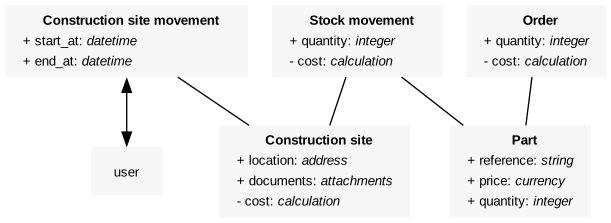
Our schema consists of 5 entities:
- Construction site movement
- Stock movement
- Order
- Construction site
- Part
Construction site movement
This entity is used to list the movements of workers (user) on construction sites. The implementation of two attributes start_at and end_at of type Datetime will make it possible to offer a calendar view to Mr. Smith.
Part
This entity makes it possible to list the parts available for construction sites. A part has a reference, a quantity and a price.
Construction site
A construction site has a location attribute, a documents attribute, and a cost virtual field whose function is SUM($stock_movements.cost). This function allows you to calculate the sum of the costs of stock movements.
Order
An order has a quantity attribute and a cost virtual field whose function is $part.price * $quantity. This function allows you to calculate the cost of an order.
An order also has two triggers:
- an after creation whose function is
$part.quantity += $quantity - an after deletion whose function is
$part.quantity -= $quantity
Both of these triggers are used to update the quantity of the associated part after adding or removing.
Stock movement
An inventory movement has a quantity attribute and a cost virtual field whose function is $part.price * $quantity. This function is used to calculate the cost of a stock movement.
A stock movement has two triggers:
- an after creation whose function is
$part.quantity -= $quantity - an after deletion whose function is
$part.quantity += $quantity
Both of these triggers are used to update the quantity of the associated part after adding or removing.
Management
In order to get an overview of his business, we suggest that Mr. Smith create metrics and charts.
Metrics
Mr. Smith wants to be alerted when a part falls below a quantity threshold of 10. To do this, we create the associated metric.
Minimum of quantities of parts
| Attribute | Value |
|---|---|
| Aggregate | Minimum |
| Data | Part |
| Field | Quantity |
| Comparator | Less than |
| Alert threshold | 10 |
Charts
Mr. Smith wants to manage the evolution of the costs of his activity. To do this, we add two charts to the main dashboard to monitor the costs of stock movements and orders by past month.
Sum of cost of stock movements per month
| Attribute | Value |
|---|---|
| Type | Column chart |
| Aggregate | Sum |
| Data | Order |
| Y-axis attribute | Cost |
| X-axis attribute | Month |
Sum of cost of orders per month
| Attribute | Value |
|---|---|
| Type | Column chart |
| Aggregate | Sum |
| Data | Stock movement |
| Y-axis attribute | Cost |
| X-axis attribute | Month |